
The Woospin casino login page is among the most visually detailed account entry screens we encountered across the Australian-facing platforms tested. Rather than a plain form overlay, the login page at Woospin org presents a split layout: the left half features the royal king mascot character alongside a five-point trust badge panel, while the right half holds the login form with a green LOGIN button and a blue REGISTER option. The page loads with the castle-corridor amber background that runs throughout the platform's visual identity.
Access is granted using an Australian mobile number and a password between 6 and 20 characters. No email address is required at any stage. This guide covers the complete login sequence, the trust features displayed on the login page, how to resolve access failures, the SMS-based password reset flow and what new players see when arriving at the registration form for the first time.
| Detail | Information |
|---|---|
| Login method | Mobile number and password |
| Password length | 6–20 characters |
| Account identifier | Australian mobile number (e.g. 61480050689) |
| LOGIN button colour | Green (distinctive from red used on comparable platforms) |
| REGISTER button colour | Blue |
| Password recovery | Forgot Password — SMS code to registered number |
| Registration name requirement | Must match bank account name — stated in red on the form |
| Players online (stated) | More than 35,000 |
| Customer service (stated) | 24 hours |
| Multi-device access | Supported — same credentials across any browser or device |
| Recommended browsers | Chrome, Safari, Firefox (latest versions) |
| Support if login fails | Live chat — bottom navigation bar |
What the Woospin login page shows
The login page at Woospin casino is a full-screen split layout rather than an overlay or modal. The left half displays the royal king mascot in a red and gold casino-themed pose with playing cards, coins and a lucky seven slot reel visible in the illustration. Below the mascot sits a five-point trust badge panel with individual icons and labels:
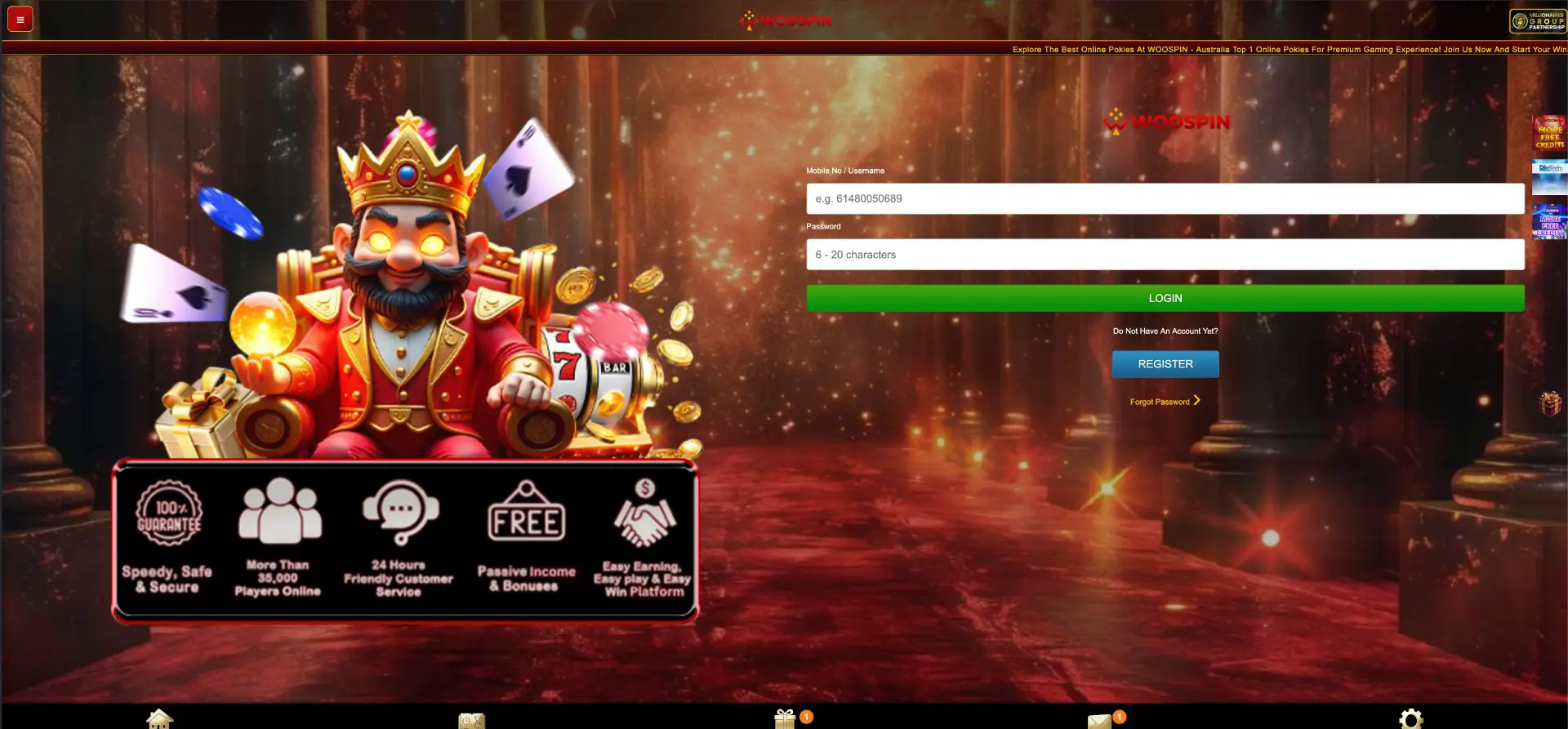
- 100% Guarantee — Speedy, Safe & Secure
- More Than 35,000 Players Online
- 24 Hours Friendly Customer Service
- Passive Income & Bonuses
- Easy Earning, Easy Play & Easy Win Platform
The right half holds the Woospin logo, the Mobile No / Username and Password fields, the green LOGIN button, the "Do Not Have An Account Yet?" prompt above the blue REGISTER button and the Forgot Password link with a right-arrow chevron. During our test on a MacBook Air running Chrome, the page rendered the split layout cleanly with no element overlap between the mascot illustration and the login form.
How to log in to Woospin casino
- Navigate to woospin.org and locate the LOG IN button in the right column of the homepage
- The login page opens as a full-screen split layout
- Enter the registered Australian mobile number in the Mobile No / Username field — example format: 61480050689
- Enter the account password in the Password field — between 6 and 20 characters
- Press the green LOGIN button to authenticate
- The account panel loads with balance, bonus status, game catalogue access and full promotions page
Returning players can also reach the login page by tapping the Login Here link on the registration form. The Woospin Login button uses a green colour — distinct from the red LOGIN buttons used on many comparable platforms — making it visually easy to identify on the login page even on smaller phone screens.
Fixing Woospin login problems
| Problem | Likely cause | Fix |
|---|---|---|
| Login rejected immediately | Wrong phone number or password | Re-enter manually without auto-fill |
| Password field shows wrong characters | Caps lock or auto-fill conflict | Clear field, disable caps lock, type manually |
| Login page fails to load | Browser cache or outdated browser | Clear cache, update to latest Chrome or Safari |
| Account temporarily restricted | Multiple consecutive failed attempts | Wait a few minutes, then use Forgot Password |
| SMS reset code not arriving | Network delay or inactive SIM | Check signal, confirm number, request code again |
| Split layout not rendering correctly | Narrow viewport or zoom setting | Reset browser zoom to 100%, or switch to portrait on mobile |
How to reset the Woospin casino login password
The Forgot Password link sits directly below the green LOGIN button on the right side of the login page. Selecting it starts an SMS-based recovery flow that sends a verification code to the registered mobile number. No original password is needed.
- Open the Woospin login page at woospin.org
- Click or tap the Forgot Password link with the right-arrow chevron
- Enter the registered Australian mobile number
- Request the SMS verification code
- Enter the received code into the verification field
- Set a new password between 6 and 20 characters
- Confirm and submit the new password
- Return to the login page and sign in with the updated credentials
If the SMS does not arrive within a few minutes, confirming the number entered matches the registered one and checking network signal resolves most cases. Players who no longer have access to the registered SIM should contact the 24-hour live chat from the bottom navigation bar for manual recovery.
Registration at Woospin — the name requirement
New players arriving at Woospin casino for the first time reach the registration page, which uses the same castle-corridor amber background as the login screen. The form fields are stacked vertically: Full Name, Mobile No, Password (6–20 characters), Referrer Code (optional) and Verification Code. A teal GET CODE button sits alongside the Verification Code field.
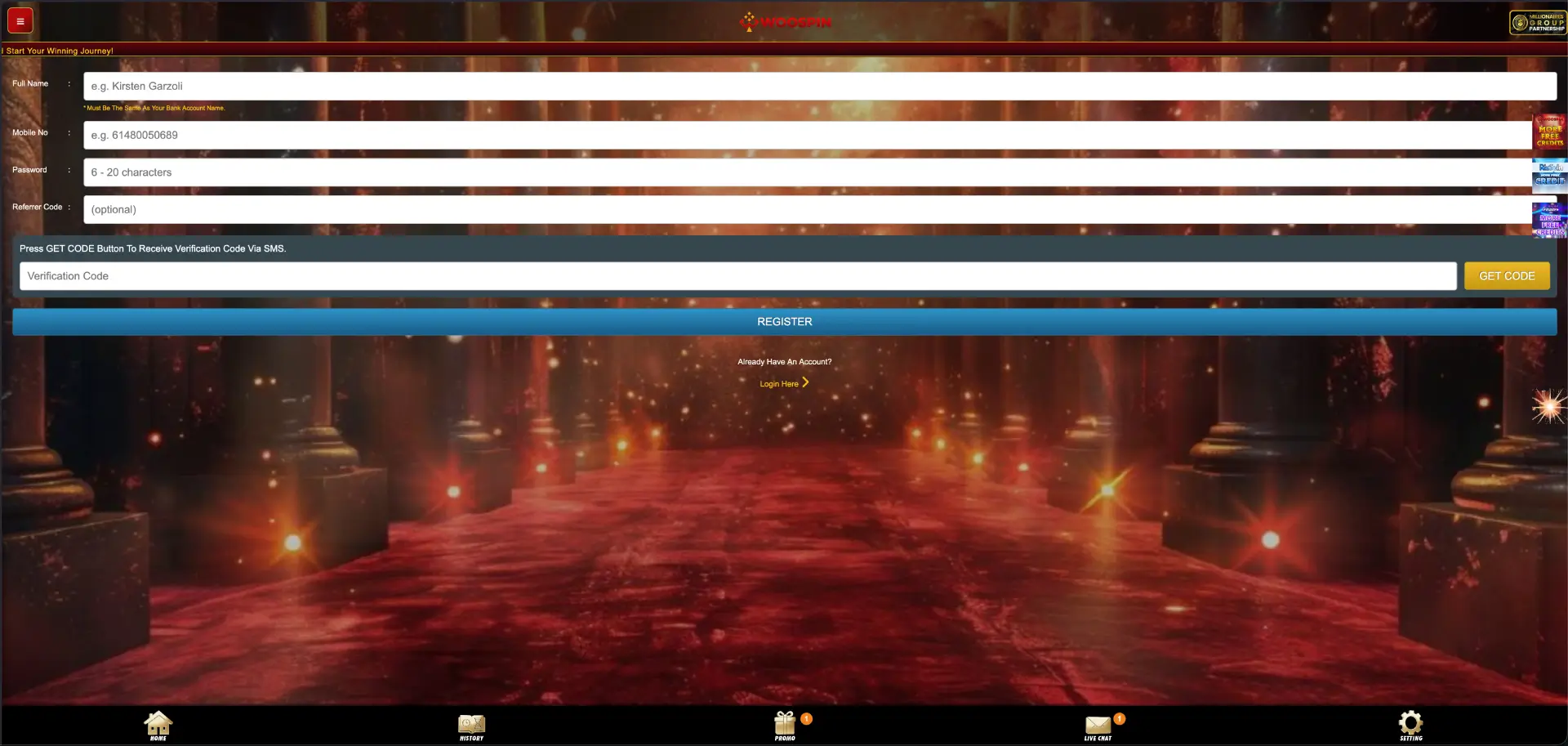
A note in red text appears directly below the Full Name field: "Must Be The Same As Your Bank Account Name." This requirement applies at the payment stage — any mismatch between the registered name and the bank account name used for deposits or withdrawals can delay processing until the discrepancy is resolved through live chat. Entering the name exactly as it appears on the bank account at registration prevents this issue from arising.
After submitting the form and pressing the blue REGISTER button, the account becomes active and grants immediate access to the lobby, deposit options and the full promotions page including the New Member Free Gift Bonus.
Logging in across multiple devices
Woospin account access is credential-based. The same mobile number and password work on any browser or device — desktop Chrome, mobile Safari, Android Chrome and the dedicated Woospin app all use the same login credentials. During our session, we verified simultaneous access on a MacBook Air and an iPhone 14 using the same account, confirming that balance and bonus status remained consistent across both instances.
Players who switch to a new phone retain access immediately by logging in on the new device with the existing credentials. If the registered mobile number has changed, live chat support handles the account update before the next withdrawal attempt.
Security on the Woospin login page
The 100% Guarantee — Speedy, Safe & Secure badge on the login page reflects the platform's stated commitment to encrypted account access. The SMS-based credential system means resetting a password requires physical possession of the registered SIM — a meaningful safeguard beyond password-only protection. Repeated incorrect login attempts slow down the authentication flow temporarily, a standard measure against automated access attempts.
Practical steps to keep Woospin casino online access consistent and secure:
- Store the password separately from the phone rather than relying only on browser auto-save
- Keep the registered Australian mobile number active and connected to the account
- Avoid submitting login credentials on public or shared Wi-Fi networks
- Clear the browser cache if the login page split layout fails to render correctly
- Use Forgot Password promptly if credentials are lost — repeated failed attempts create a temporary lockout
FAQ
How do I log in to Woospin casino?
Go to woospin.org, tap the LOG IN button in the right column, enter the registered Australian mobile number and password, then press the green LOGIN button. The account panel loads immediately after authentication.
The LOGIN button at Woospin casino is green — distinguishing it visually from the red buttons used on comparable Australian-facing platforms. The REGISTER button on the same page is blue.
What does the Woospin login page trust badge say?
The five-point trust badge displayed on the left side of the login page states: 100% Guarantee (Speedy, Safe & Secure), More Than 35,000 Players Online, 24 Hours Friendly Customer Service, Passive Income & Bonuses, and Easy Earning, Easy Play & Easy Win Platform.
Why does my name need to match my bank account at Woospin?
Woospin requires the full name entered at registration to match the name on the bank account used for deposits and withdrawals. This is stated in red text on the registration form. A mismatch can delay withdrawal processing until resolved through live chat. Entering the exact bank account name at registration prevents this issue.
Can I log in to Woospin on multiple devices?
Yes. The same mobile number and password authenticate the account on any browser or device, including the dedicated Woospin app. Balance, bonus status and session history are consistent across all access points.
How do I reset my Woospin casino password?
Tap Forgot Password on the login page, enter the registered mobile number, request the SMS code, enter it into the verification field and set a new password between 6 and 20 characters. The process typically completes in under two minutes if the registered SIM is active.
What do I do if I can no longer access my registered mobile number?
The SMS-based reset flow requires the original SIM to receive the verification code. Players who have changed numbers should contact the 24-hour live chat support via the bottom navigation bar to begin manual account recovery before attempting any deposits or withdrawals.